Reconciliation
Reconciliation in Automated Back Office allows matches to be performed for accuracy and completeness between records. Through reconciliation, transactions processed through your program accurately reflect the financial activities of your cardholders and the records maintained by the Card Scheme.
The platform provides two types of reconciliation. These include:
-
Activity Reconciliation — ensures that every transaction amount settled from the card network matches what is processed by Thredd.
-
Transaction Matching — compares all the transactions within an authorization file (non-clearing) with all the transactions in a clearing file.
Activity Reconciliation
Activity Reconciliation uses the Card Scheme for daily files such as T140 (Mastercard) and VSS (Visa) to compare the reported total settlement amount with the totals processed by Thredd. The totals processed include the following data and its components:
|
Option |
Description |
|---|---|
|
Transactions |
Transactions that a cardholder made which include purchases and any refunds. |
|
Interchange Fees |
Transaction fees paid by Acquirers to Issuers. Each time a cardholder makes a payment at a merchant, the Acquirer of the merchant is charged a fee. |
|
Scheme Fees |
Charges associated with the Card Scheme. |
|
Chargebacks |
Amount from requests made by a cardholder for a disputed transaction. This received amount is either a credit or a debit. |
If the figures on both sets of files match, the amounts on that day are Reconciled. If not, the activity for that day is Unreconciled and the gap in the amounts appear between the daily processed and daily settlement figures.
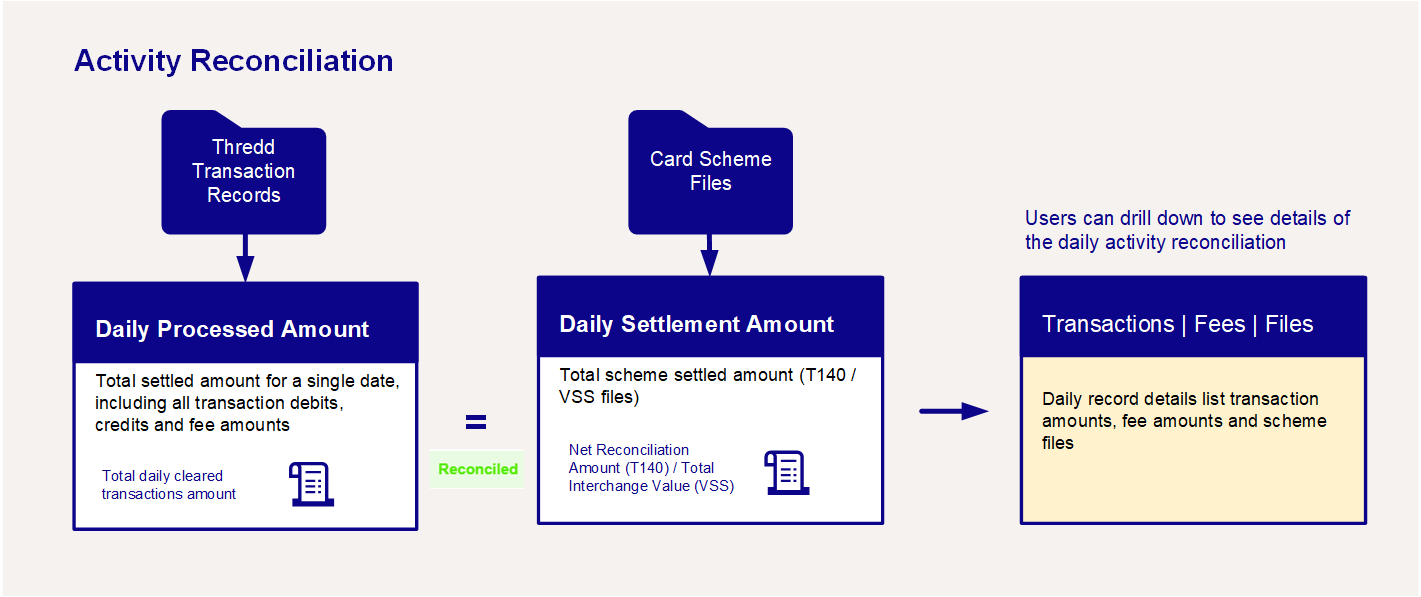
For more information on how to use Activity Reconciliation, see Viewing Activity Reconciliation Status.
You can view the list of transactions for that day, their matching status, as well as the daily T140 or VSS files from the Card Scheme. See Viewing Activity Reconciliation Records.
Transaction Matching
Transaction Matching includes a matching process, which uses a set of variables between the authorization and clearing to confirm a Match. If the system did not find a Match, Automated Back Office lists the transaction as Unmatched.
To deliver a summary, Automated Back Office shows a set of Matched and Unmatched transactions under each day of Activity Reconciliation. A single day can have a status of Reconciled but still include Unmatched transactions. This could be for various reasons. For example, a forced posted transaction without a corresponding authorization in a T140 or a clearing file would cause the single day to be unrecognised. This is because there is no authorization that matches the posted transaction.
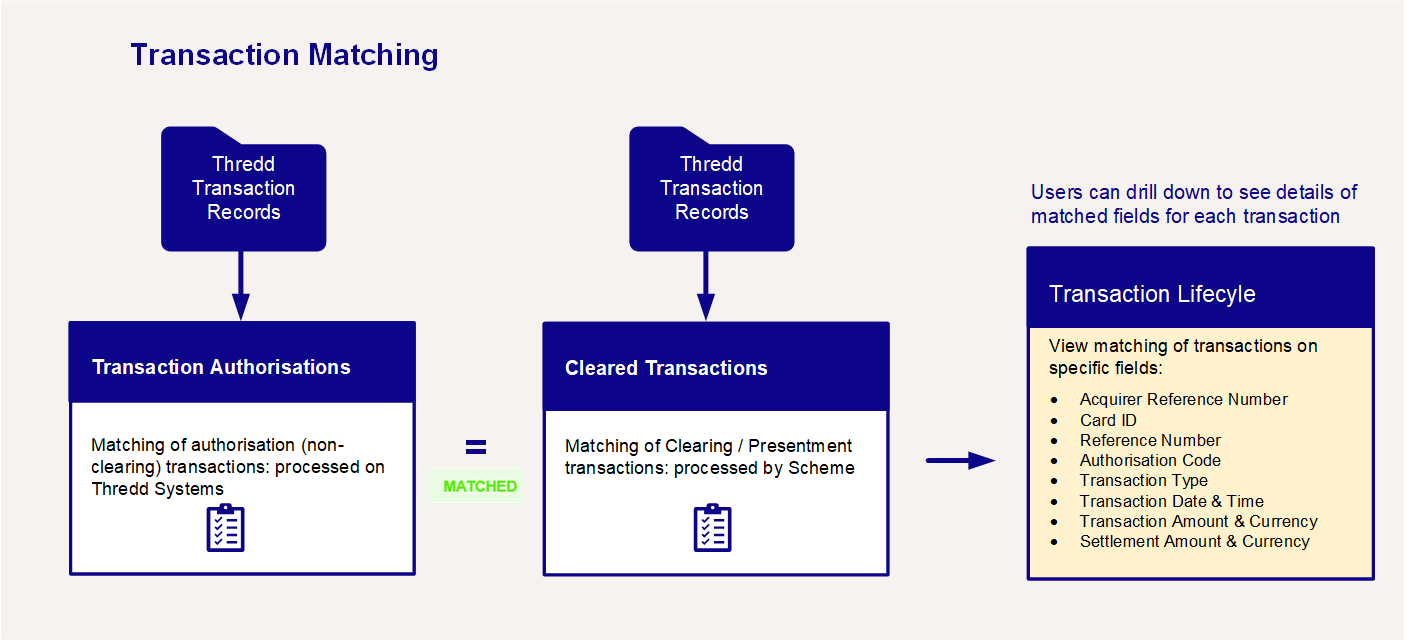
For more information on how to use transaction matching, see Using Transaction Matching.
Processing Files for Reconciliation
Automated Back Office displays new files every 20 minutes from the cut-off time set by the client for uploading to the system.
Standard Collection Files in Reconciliation
Automated Back Office uses various files for reconciliation as part of a Standard Collection. These are described as follows:
|
Type of File |
Description |
|---|---|
|
Card Scheme-Specific Files |
These include:
|
|
Clearing Files |
Files received on a daily basis in the following format: THRD-PPPP-CLR-YYYYMMDDHHMM-YYYYMMDDHHMM.PX.xml The notation is as follows: THRD — Abbreviation for Thredd. PPPP — Programme manager code or name. NCLR — Report code. NCLR is for a Non-Clearing file. YYYYMMDDHHMM — FromTime, first occurrence after report code. This includes YYYY for year (4 digits), MM for month (2 digits) and DD for day (2 digits). YYYYMMDDHHMM — ToTime, second occurrence after report code). This includes YYYY for year (4 digits), MM for month (2 digits) and DD for day (2 digits). PX - Thredd production environment used to generate the report, value of X indicating the exact environment.
|
|
Non-Clearing Files |
Files received on a daily basis in the following format: THRD-PPPP-CLR-YYYYMMDDHHMM-YYYYMMDDHHMM.PX.xml THRD — Abbreviation for Thredd. PPPP — Programme manager code or name. CLR — Report code. CLR is for a clearing file. YYYYMMDDHHMM — FromTime, first occurrence after report code. This includes YYYY for year (4 digits), MM for month (2 digits) and DD for day (2 digits). YYYYMMDDHHMM — ToTime, second occurrence after report code). This includes YYYY for year (4 digits), MM for month (2 digits) and DD for day (2 digits). PX - Thredd production environment used to generate the report, value of X indicating the exact environment. |