One-Time Password (OTP) Authentication
The Access Control Server (ACS) Controls the rates for FX currency conversions if the purchase currency is different from the card’s currency. generates a single-use One-Time Password (OTP). Thredd sends the OTP in an SMS text message to the cardholder’s mobile phone number and the cardholder enters the OTP in the 3D Secure screen to authenticate the e-commerce transaction.
The figure below provides an overview of the cardholder authentication process during a transaction, using One Time Password (OTP) authentication.
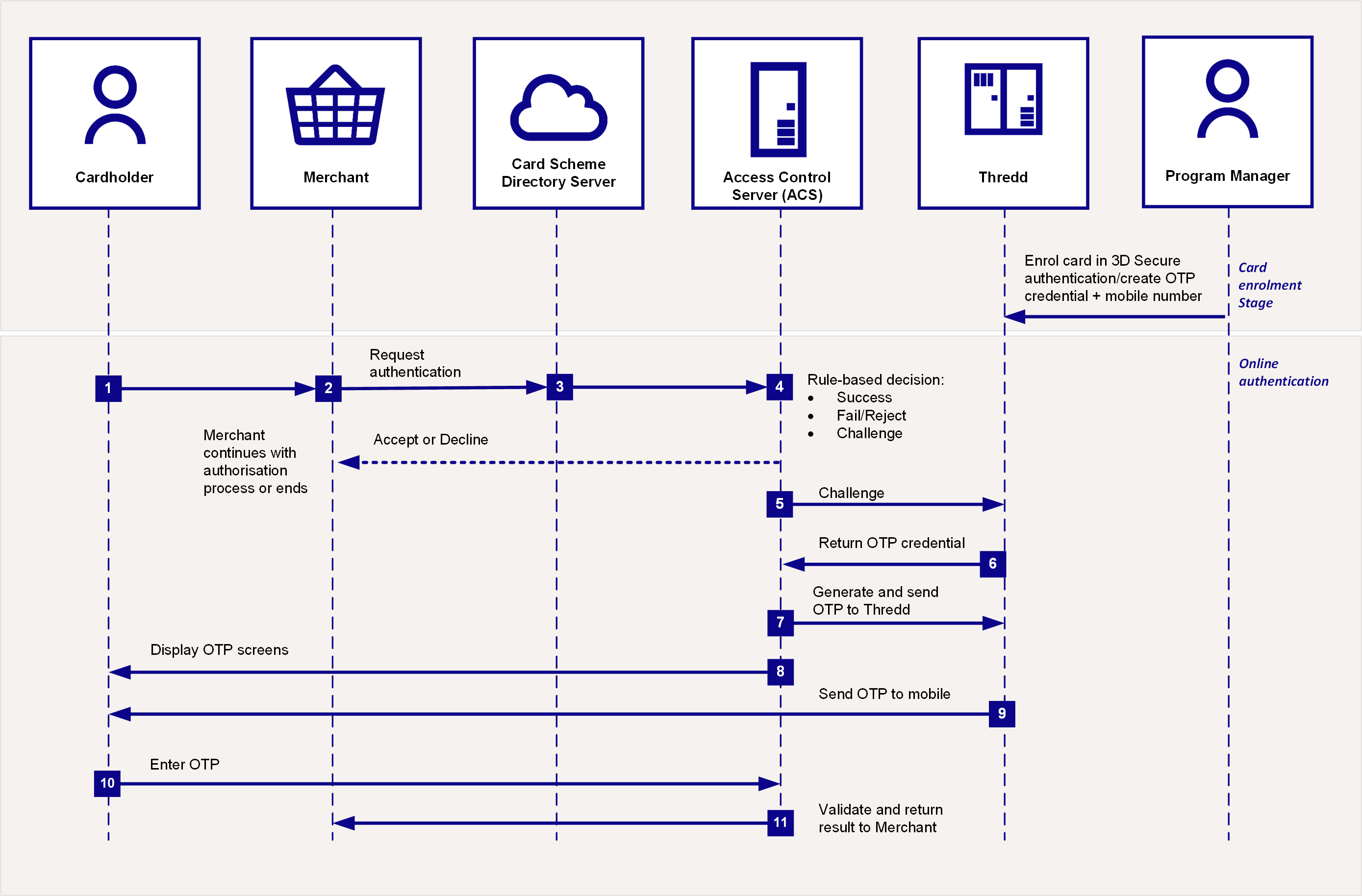
Figure: One-Time Password (OTP) Athentication Call Flow
Prior to using OTP, you need to set up the OTP credential on the card.
-
The cardholder uses their card at a merchant website.
-
If the merchant is enrolled in 3D Secure, they send a request for authentication to the Card Scheme (Mastercard/Visa).
-
The Card Scheme looks up the 3D Secure service provider and sends the authentication request to the Access Control Server (ACS)
Controls the rates for FX currency conversions if the purchase currency is different from the card’s currency.. -
The ACS checks to confirm the card BIN range is enabled for 3D Secure. Based on the rules you set up for your card program, the outcome is Success, Fail/Reject or Challenge, with the next steps as described in the following table:
Outcome
What happens next?
Success
An approval response is returned to the merchant. The merchant can continue with the authorisation
A system used to manage the 3D Secure authentication service for the issuer. During an authentication session, the ACS communicates with the Card Scheme and Thredd systems, and may also interact with the cardholder, by providing Challenge screens. request.Fail or Reject
An authentication failure or reject response is returned to the merchant. They can decide whether to continue to request transaction authorisation or ask the cardholder to provide an alternative payment method.
Challenge
3D Secure authentication is required, and Challenge screens are shown to the cardholder.
-
The ACS connects to Thredd in real-time to check the types of authentication the card is registered for (e.g., Biometric, OTP SMS or KBA).
-
Thredd replies to the ACS with OTP SMS as the type of authentication registered on the card (based on what you registered the card for using the Web Services/ Cards API
This is an Apple term for a Token Provisioning request that is approved, but with a request for further enhanced verification and with Wallet Reason 16 ("High fraud risk, enhanced verification recommended") set. and your product configuration at Thredd). -
The ACS generates the OTP and sends it to Thredd in real-time.
-
The ACS displays the OTP entry pop-up screens to the cardholder on the merchant website or App.
-
Thredd sends the OTP to the mobile number Thredd has on record for the cardholder, via SMS.
-
The cardholder enters the OTP in the 3DS pop up screen on the merchant's website or App to complete their authentication.
-
The ACS validates the OTP and sends the validation result back to the merchant.
What happens after authentication?
Once the cardholder is authenticated, the merchant can proceed with requesting authorisation for the transaction. (The merchant acquirer includes the 3DS secure value they receive from Cardinal within the transaction: UCAF field.)
Thredd validates the 3DS key for a Mastercard transaction (for Visa, Visa generates the key and validates it).
Depending on your External Host Interface (EHI) mode, Thredd approves/declines the transaction or sends to your EHI endpoint to approve or decline.
You can view details of your 3D Secure transactions in the 3D Secure Portal.
For more information, refer to the 3D Secure Guide (Apata) or 3D Secure Guide (Cardinal).