3 Transactions on a Token
Once the digital token (DPAN Device PAN. The PAN value set up on the cardholder’s device. This is not visible to the cardholder, but is the PAN used for the transactions as far as the merchant is concerned.) has been created, it can be used in place of the card for payment authorisation transactions. Transactions on a token look like standard transactions on the card, but the payment token has additional data. Some of this data needs to be gathered and reported to token requestors such as Apple or Android.
3.1 Personalisation on a Device
Tokenisation of devices such as mobile phones and smart watches allows them to be used in the same way as physical cards. During tokenisation the mobile device is personalised. This is the process in which the device is marked with private data specific to that token and device. Personalisation is the same process as used on a physical card when chip data is added to the card prior to issuance.
Personalisation can either be done on the device or SIM card (known as Secure Element tokenisation) or in the cloud using Host Card Emulation (HCE).
-
Apple Pay, which has access and control of the device and has pre-installed EMV chips that can be personalised, uses Secure Element (SE)
-
Android, which is an operating system installed on various devices owned by other companies, uses HCE1.
Other Mobile Wallet token requestors vary between SE and HCE and it is their decision which option is implemented. Thredd can support both SE and HCE mobile wallet token requestors.
The data from the personalised device is transmitted to the Point of Sale (POS) terminal A hardware device for processing card payments at retail stores. The device has embedded software that is used to read the card’s magnetic strip data. during an in-store transaction. The POS terminal then formats this into an authorisation request, which does not contain the real PAN, but uses the device token. This authorisation request is sent to Visa/Mastercard who maps the token back to the PAN before sending on to Thredd.
3.2 Visa/Mastercard Stand-In Processing
When setting up your programme configuration options on Visa or Mastercard, you must specify that they do not authorise Tokenisation Approval Requests (TARs) on behalf of Thredd. A TAR must always be generated by the token service provider and approved by Thredd2. Thredd declines transactions on tokens that do not exist on the Thredd platform.
3.3 Making a Purchase using a Tokenised Device
Figure 7 below shows the flow for a tokenised device:
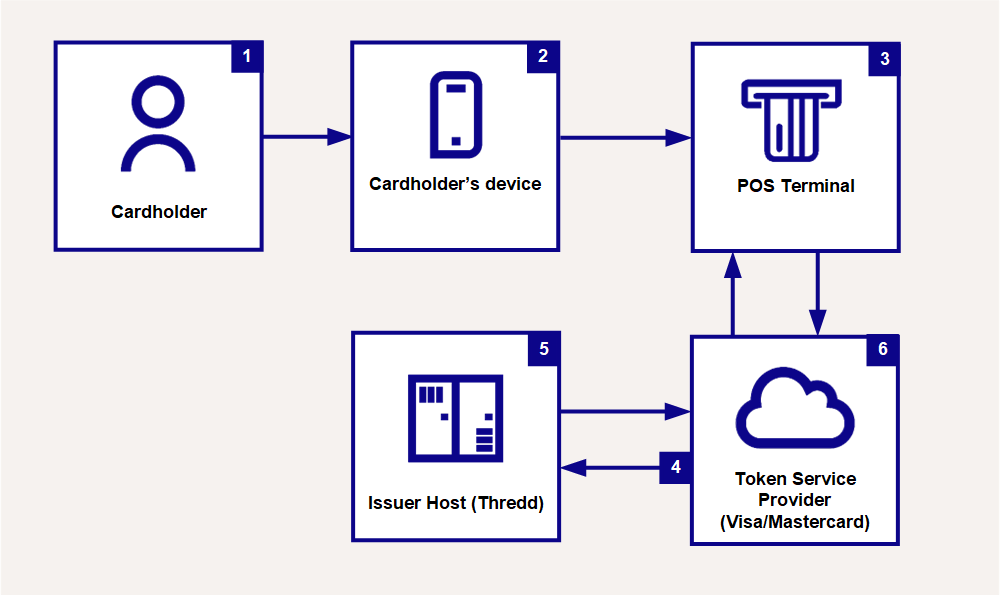
Figure 8: Authorisation Request from Mobile Device
-
The cardholder makes an in-store purchase with an NFC
Near Field Communication (NFC) is a technology that enables a device, such as a mobile phone or payment ring, to transmit data to a Point of Sale (POS) terminal, enabling contactless payments.-enabled tokenised device. -
The device transmits personalised data to the POS terminal
A hardware device for processing card payments at retail stores. The device has embedded software that is used to read the card’s magnetic strip data. using the contactless interface. -
The POS terminal generates the authorises the request, using the stored token (DPAN
Device PAN. The PAN value set up on the cardholder’s device. This is not visible to the cardholder, but is the PAN used for the transactions as far as the merchant is concerned.) and sends, via the merchant Acquirer Banking organisation and licensed scheme member that enables merchants to take card payments and send payment authorisation requests to the issuer using the card scheme’s network., to the card scheme (Visa/Mastercard)3.
-
Visa/Mastercard maps the token back to the PAN (FPAN
Funding PAN. The true 16-digit PAN of the card, which Mastercard/Visa converts when authorisations come through to them from Acquirers on the DPAN.) and sends to Thredd for authorisation. -
Thredd approves or declines the transaction.
-
Visa/Mastercard returns the authorisation response to the merchant. If approved, the merchant provides the goods to the cardholder.
3.4 Making a Purchase using an Online website
For Online Merchant Token Requestors A token requestor that is an e-commerce merchant., the merchant uses the token associated with the cardholder to create and send an authorisation request. If it is the first time a card has been used with that merchant, then the tokenisation of the PAN will not have yet taken place; in this case the authorisation uses the real PAN initially and is then tokenised before storage. See Figure 8 below.
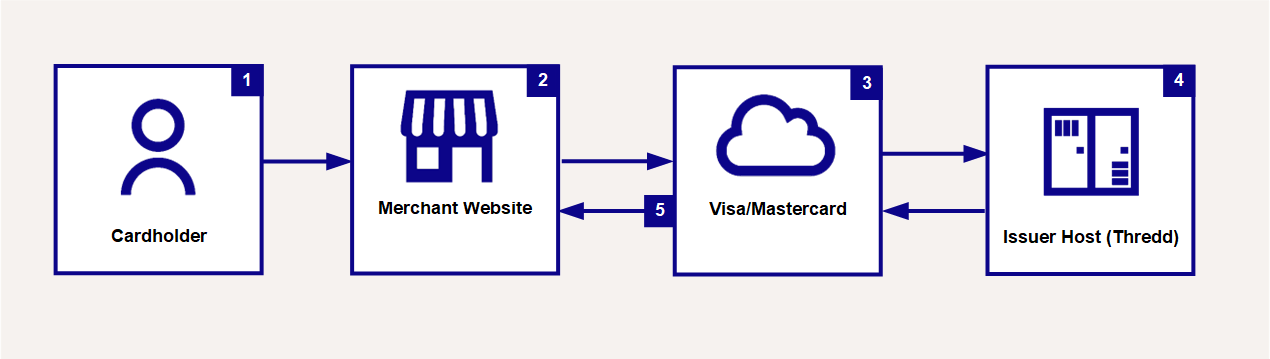
Figure 9: Authorisation Request from an Online website
-
The cardholder makes a payment on a merchant’s website.
-
The merchant’s systems generate the authorisation request using the stored token value and sends the request, via their Acquirer
Banking organisation and licensed scheme member that enables merchants to take card payments and send payment authorisation requests to the issuer using the card scheme’s network., to the card scheme (Visa/Mastercard). -
Visa/Mastercard maps the stored token back to the PAN and sends to Thredd for authorisation.
-
Thredd approves or declines the transaction.
-
Visa/Mastercard returns the authorisation response to the merchant. If approved, the merchant provides the goods to the cardholder.