3 Transaction Flow Scenarios
This section provides examples of typical transaction flows with Message Transaction IDs (MTIDs) on Discover networks. This provides a flavour of the type of messages you can expect to receive from the Thredd system.
The examples below are for customers connecting to Discover networks. Only flows for transaction types supported in Discover Phase 1 are shown.
3.1 Authorisations
Authorisation is the stage in a transaction life-cycle where a merchant The shop or store providing a product or service that the cardholder is purchasing. A merchant must have a merchant account, provided by their acquirer, in order to trade. Physical stores use a terminal or card reader to request authorisation for transactions. Online sites provide an online shopping basket and use a payment service provider to process their payments. requests approval for a card payment amount. If the authorisation is approved, the amount is ring-fenced on the card. Typically the merchant then has 7 days to request the transfer of the authorised funds (although this can be up to 30 days for certain types of transactions/ merchant category codes). For additional information see What are Authorisations and how do they work?
Authorisation with Approve
The following scenario illustrates a typical approve journey for EHI modes 1, 2 and 4 (Gateway and Cooperative Processing).
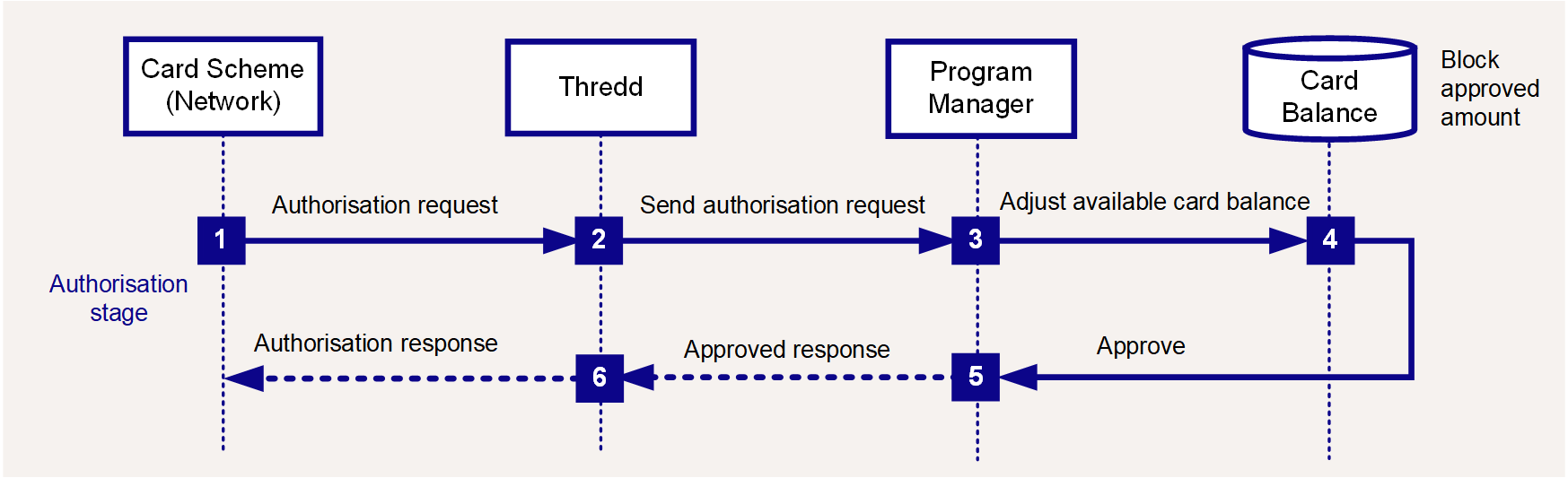
Figure 2: Authorisation Flow - Approve
-
The scheme sends a 1100 authorisation request to Thredd.
-
Thredd carries out validation checks and sends the request (we map this to our 0100 message format) to the external host (Program Manager).
-
The Program Manager approves the request.
-
The Program Manager blocks the approved amount (including fees) on the card and reduces the available balance.
-
The Program Manager returns an approved response:
<Responsestatus>00</Responsestatus> and <Acknowledgement>1</Acknowledgement>.*
"Responsestatus": "00" and "Acknowledgement": "1".*
-
Thredd responds to the scheme with an 1110 message (with response status 00 indicating an approval).
* Responsestatus = 00 indicates the request is approved; Acknowledgement = 1 informs Thredd that the message was received and Thredd does not need to resend.
Authorisation Resulting in a Decline
The following scenario illustrates a typical decline journey for EHI modes 1, 2 and 4 (Gateway and Cooperative Processing).
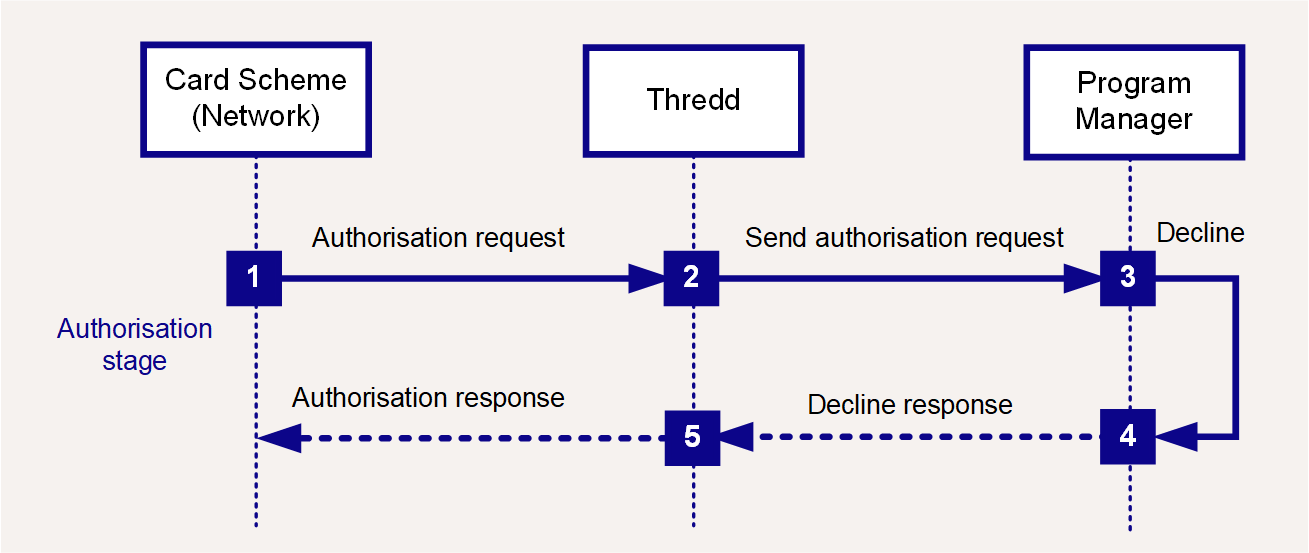
Figure 3: Authorisation Flow - Decline
-
The scheme sends a 1100 authorisation request to Thredd.
-
Thredd carries out validation checks and sends the request (we map this to our 0100 message format) to the external host (Program Manager).
-
The Program Manager declines the request.
-
The Program Manager returns a declined response, for example:
<Responsestatus>05</Responsestatus> and <Acknowledgement>1</Acknowledgement>.*
"Responsestatus": "05" and "Acknowledgement": "1".*
-
Thredd responds to the scheme with an 1110 message (with an appropriate response status, e.g 100, indicating a decline).
* Responsestatus = 05 indicates Do not honour. You can return any suitable decline response code you use for other Networks. See Response Codes.
The original response code sent to Discover in response is different (Discover supports 3 digits response codes and Thredd maps the response code value you provide to the Discover equivalent. For example, for do not honour (05), Thredd converts it to 100 while sending to Discover.
Acknowledgement = 1 informs Thredd that the message was received and Thredd does not need to resend.
Discover Network does not restrict usage of generic response codes. Thredd still recommend your decline reason code should be as specific as possible, to guide the cardholder and merchant.
Authorisation Reversal (network)
This type of transaction occurs when the merchant, acquirer The merchant acquirer or bank that offers the merchant a trading account, to enable the merchant to take payments in store or online from cardholders. or card scheme requests a reversal of the original authorisation. This should result in the amount previously ring-fenced on the card being unblocked.
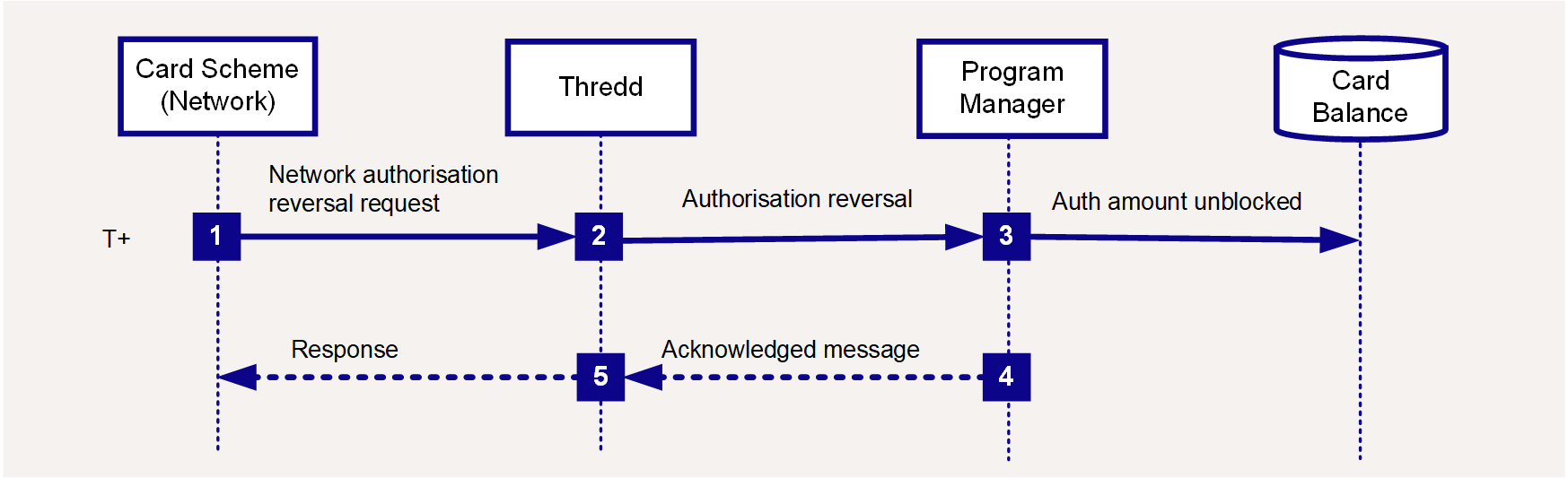
Figure 4: Authorisation Reversal Flow
-
The scheme sends a 1420 authorisation reversal request to Thredd.
-
Thredd sends an 0420 message request to the external host (Program Manager).
-
Thredd responds to the scheme with a 1430 message.
-
The Program Manager matches the reversal message to the original authorisation message. See Transaction Matching.
The Program Manager unblocks the authorised amount and updates the cardholder's available balance. -
The Program Manager acknowledges the message:
acknowledgement= 1.
Authorisation Reversal (non-network)
If no presentment (request to settle the amount previously authorised) is received within the Thredd hanging filter The period of time during which waits for an approved authorisation amount to be settled. This is defined at a product level. A typical default is 7 days for an auth and 10 days for a pre-auth. period, Thredd automatically reverses the authorisation.
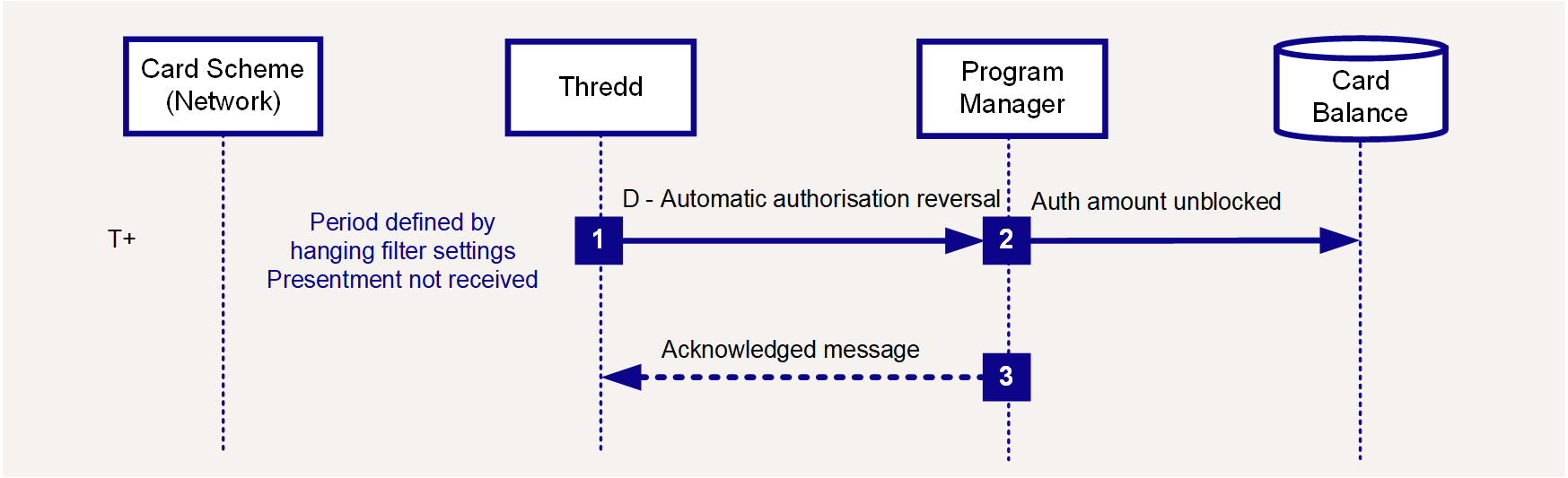
Figure 5: Authorisation Reversal Flow
-
If no presentment is received within the time period set by the hanging filter
The period of time during which waits for an approved authorisation amount to be settled. This is defined at a product level. A typical default is 7 days for an auth and 10 days for a pre-auth., EHI sends a financial reversal message to the external host (Program Manager). -
The Program Manager matches the reversal message to the original authorisation. See Transaction Matching.
The Program Manager unblocks the authorised amount and updates the cardholder's available balance. -
The Program Manager acknowledges the message:
acknowledgement= 1.
Incremental Authorisation
An incremental authorisation is an additional authorisation, following a previous transaction authorisation, which is used to request an additional amount for the same product or service purchased by the cardholder. See What is an incremental authorisation and how do I identify it?
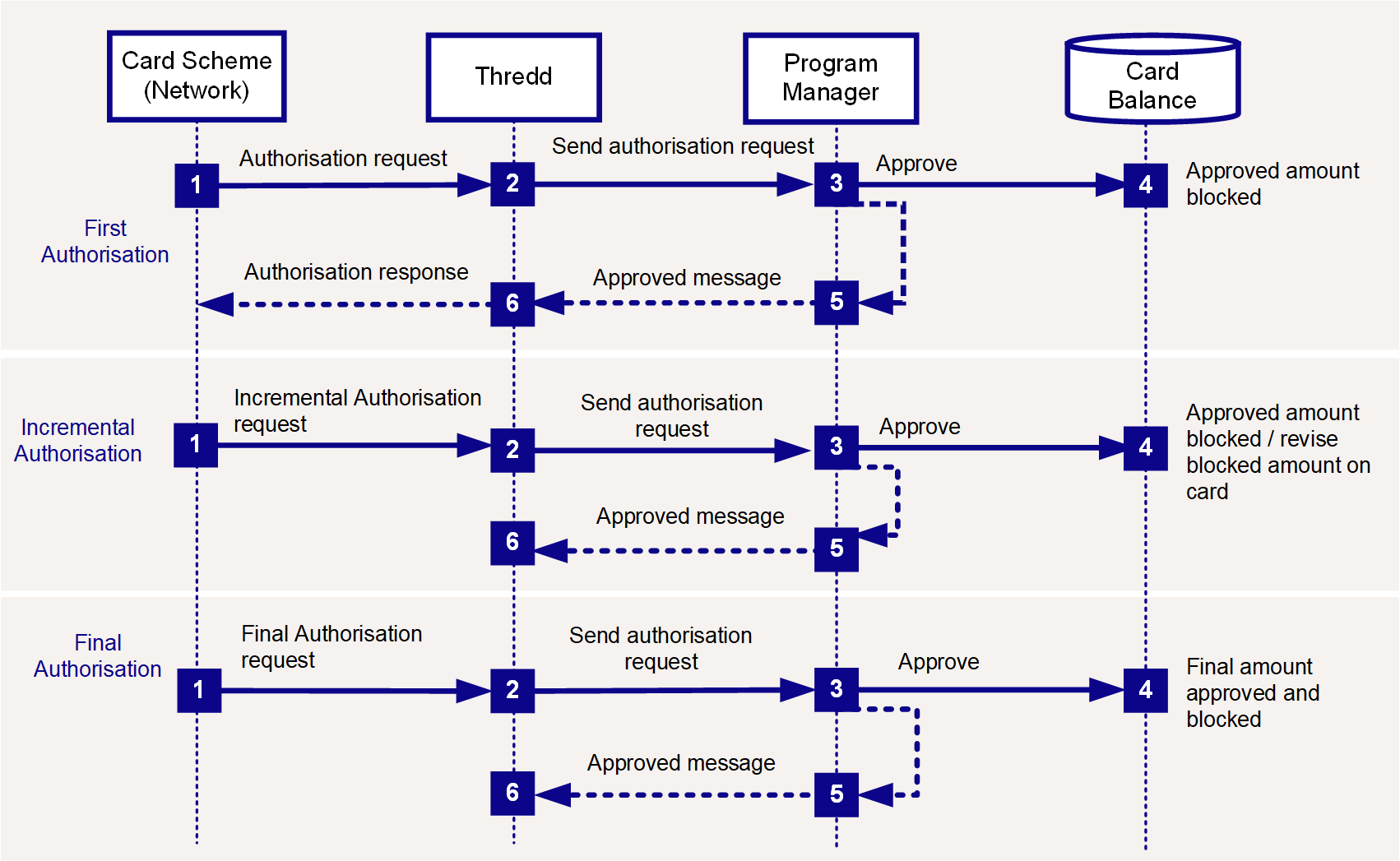
Figure 6: Incremental Authorisation Reversal Flow
-
A request for the first authorisation is received, and follows the steps of a normal authorisation. See Authorisation with Approve.
-
When you receive the incremental authorisation (
auth_type= P or 0), where you maintain the card balance and approve, you should block the additional amount. -
If you receive the final authorisation (
auth_type= F), where you maintain the card balance and approve, you should revise the amount blocked on the card based on the final amount.
You will receive a single financial presentment, which includes the sum of all incremental authorisations.
Refund
A refund transaction occurs when a merchant refunds money to the cardholder, typically relating to a previously processed transaction. The merchant/acquirer submits a request for a partial or a full refund of a previously paid amount. This is typically processed as an 1100 Authorisation request (we will map this to a 0100 message type) for a positive billed amount, with the DE3 processing code of 20. This 2-digit code is displayed in the Thredd (Proc_Code) transaction field.
It is not recommended to update the available balance until the linked financial notification is received. You must make information about any pending refund transactions available to cardholders.
3.2 Financials
Thredd receives batch 1 files containing financial transactions (presentments) for authorisations that need settlement. Typically the authorisations happened the previous day. Thredd processes the clearing files and sends a separate notification via EHI for each presentment transaction. For additional information see What are Presentments and how do they work?
All Discover files are received between 10 am to 2 pm in no particular order.
Chargebacks and Network fee details are sent as a separate file at 2 pm daily. Thredd will send a separate message for each chargeback event.
First Presentment
First presentment occurs when the merchant sends a request to take either part or all of the amount previously authorised on the card2. This can happen at the same time as the authorisation request or in some cases it can be much later. The Program Manager should attempt to match the presentment to the original authorisation request.
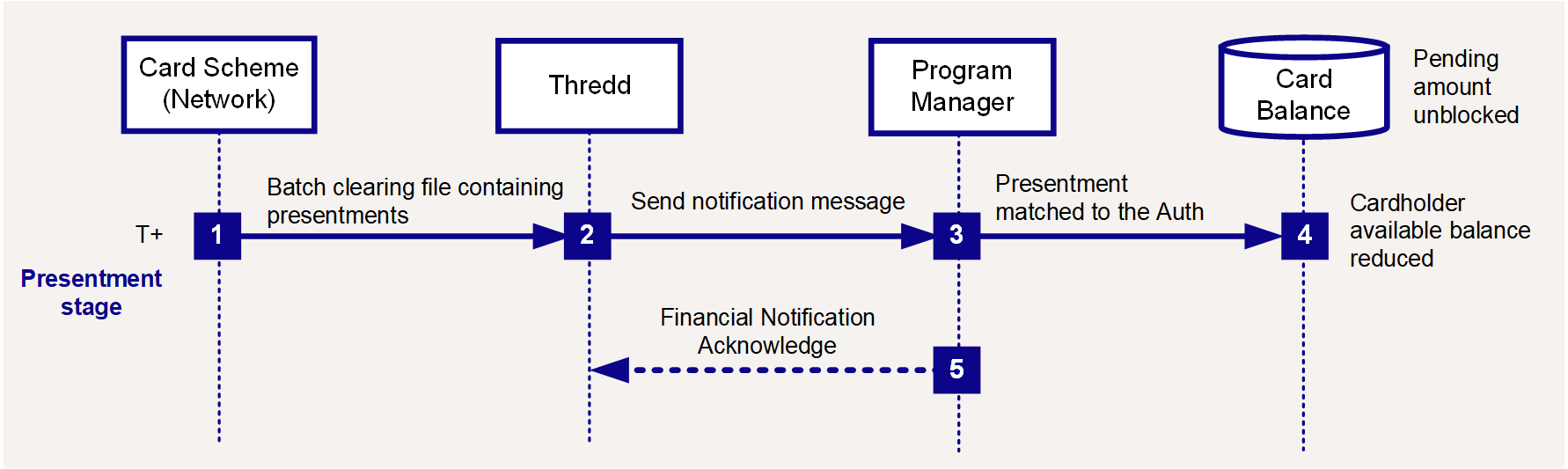
Figure 7: Presentment Flow
-
The scheme sends a batch clearing file to Thredd.
-
Thredd processes the file and sends a notification message per presentment, via EHI, to the external host (Program Manager).
-
The Program Manager matches the presentment to the original authorisation. See Transaction Matching.
-
The Program Manager unblocks the pending amount and reduces the cardholder's available balance.
-
The Program Manager acknowledges the message:
acknowledgement= 1.
First Presentment for an Offline Transaction
In an offline transaction This is often used in scenarios where the merchant terminal is not required to request authorisation from the card issuer (for example for certain low risk, small value transactions used by vending machines, commuting and transport networks).
The card chip and terminal determine if the offline transaction is permitted under EMV/Scheme rules; if not supported, the terminal declines the transaction. Note: Since the balance on the card balance is not authorised in real-time, there is a risk that the card may not have the amount required to cover the transaction., Thredd has not received a previous authorisation transaction, so when a financial presentment message is received from the card schemes, we are unable to match to an 0100 authorisation transaction. In this case, Thredd creates a new authorisation transaction and sends this to the Program Manager, followed by the linked presentment message.
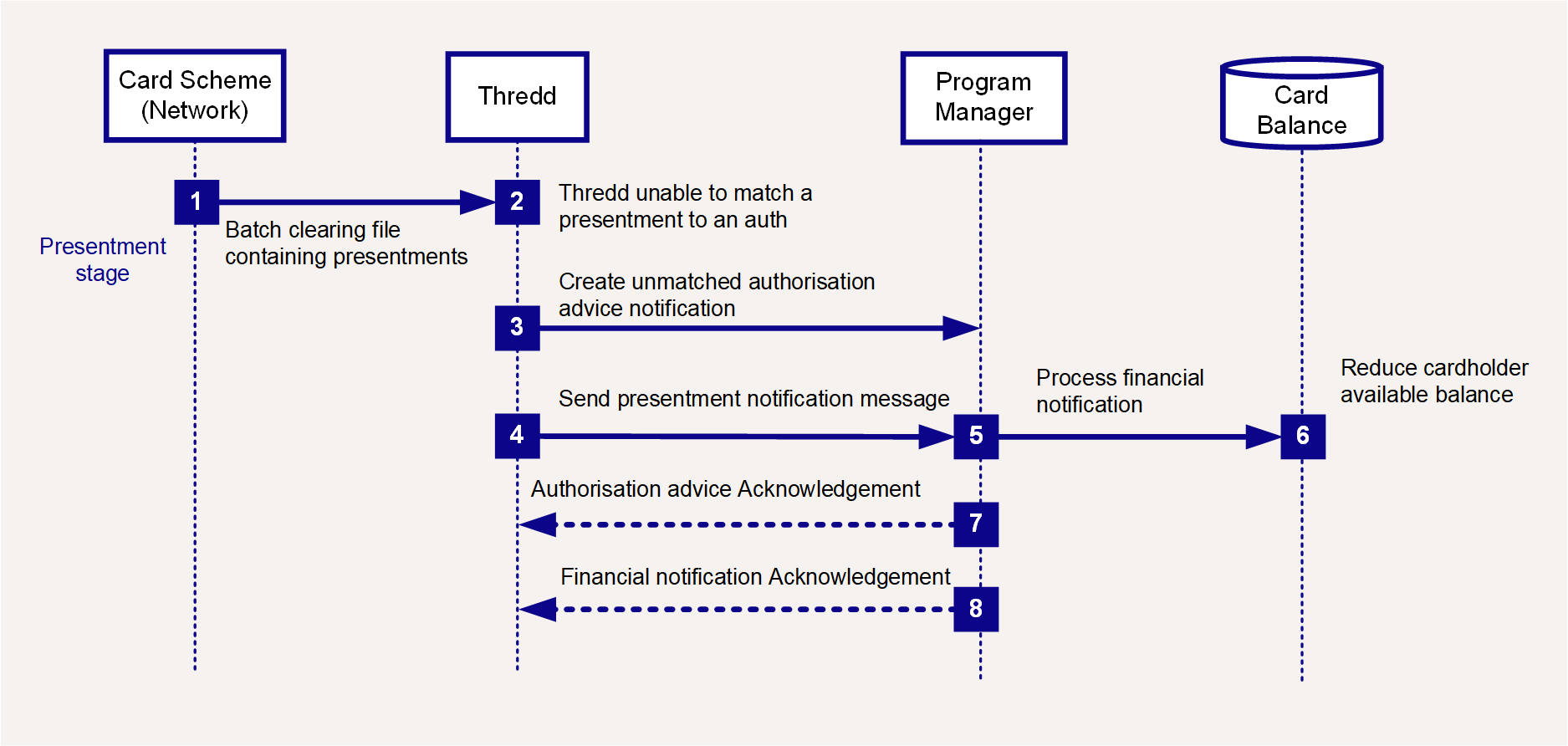
Figure 8: Offline Transaction - Presentment Flow
-
The scheme sends a batch clearing file to Thredd.
-
Thredd carries out validation checks. Since this is an offline transaction, Thredd will not be able to match to an existing 0100 authorisation.
-
Thredd creates an Unmatched Authorisation Advice Notification and sends it the external host (Program Manager).
-
Thredd sends a presentment notification to the Program Manager.
-
The Program Manager processes the financial notification (matching it to the Unmatched Authorisation Advice Notification).
-
The Program Manager reduces the cardholder's available balance by the amount of the presentment.
-
The Program Manager acknowledges the authorisation message:
acknowledgement= 1. -
The Program Manager returns a financial notification acknowledgement:
acknowledgement= 1.
Incremental Presentment
An incremental presentment may occur when a merchant requests an authorisation for a specific amount, but then submits multiple presentments for different partial amounts. An incremental presentment has one authorisation and multiple presentment files. The final presentment total usually equals the total of the original authorised amount. For more information, see What are incremental presentments and how do I handle them?
Financial Reversal
A financial reversal occurs when the acquirer cancels all or part of a prior transaction (which may be a purchase, refund, cashback, cash, PIN change, or any other transaction type).
For example, if the acquirer has already taken the funds and are aware of a processing error (e.g., double charging), they can submit an 06 (Thredd 1240) Financial Reversal. You must return any deducted amounts back to the card.
For a financial reversal, if the card has subsequently been lost, stolen or replaced, then the card record will be in a blocked and inactive/archived status, and you will not be able to update the card status or process transactions on the card. You should have a process in place to provide the reversed funds to your customer (e.g., move money to another account belonging to your customer).
3.3 Chargebacks
A chargeback Where a cardholder disputes a transaction on their account and is unable to resolve directly with the merchant, they can raise a chargeback with their card issuer. The chargeback must be for a legitimate reason, such as goods and services not received, faulty goods, or a fraudulent transaction. is a mechanism available to cardholders who dispute a transaction on the card and want part or all of a card payment returned. The chargeback is always issued by the card issuer or Program Manager. You can create a chargeback using the Discover Xchange Platform. For more information, refer to the Discover Chargeback Guide and the Discover Xchange User Guide.
Chargeback and Second Presentment
A chargeback can only be created for a transaction that has a linked presentment. The Program Manager or card issuer creates the chargeback request, which is sent to Discover. This triggers the process described below.
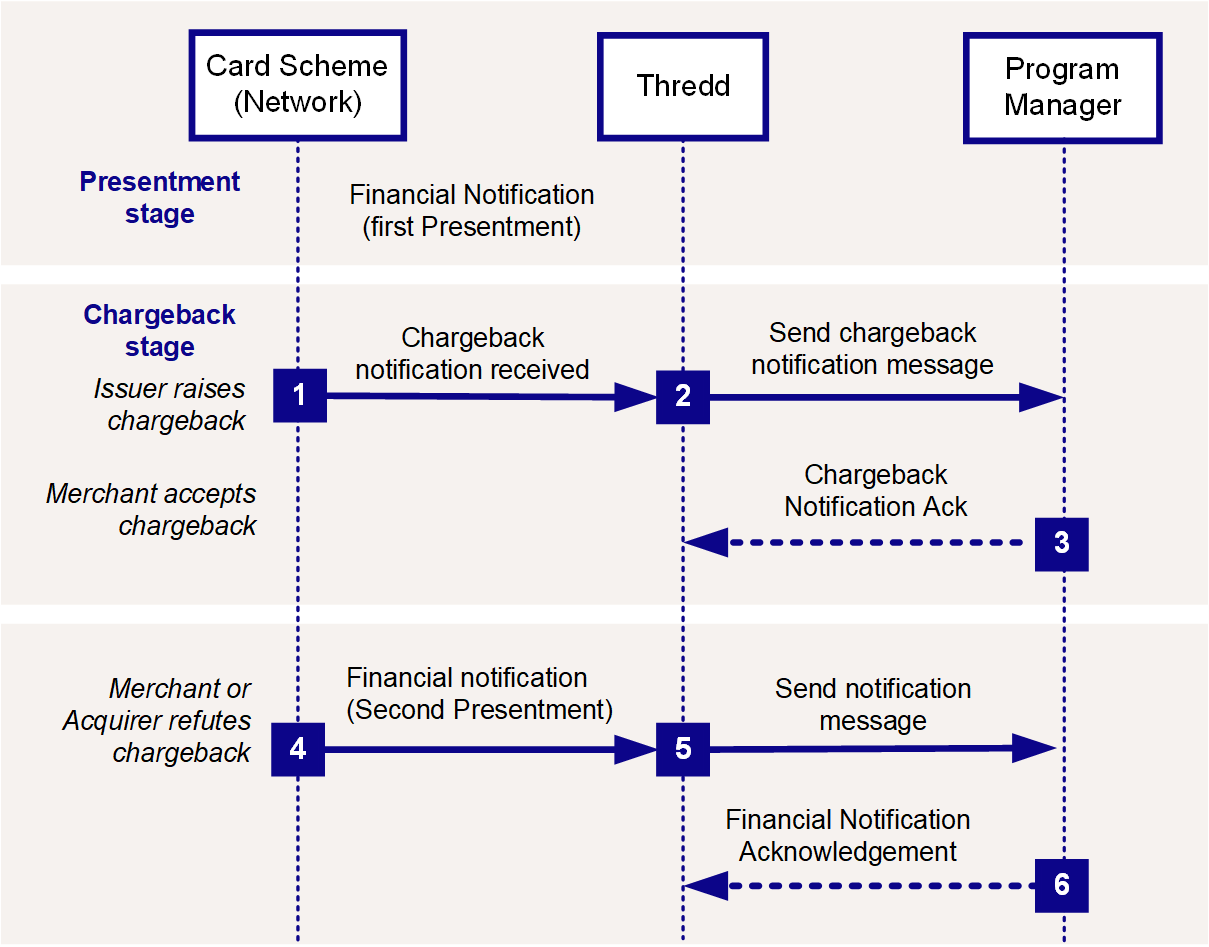
Figure 9: Chargeback Transaction Flow
-
Thredd receives a chargeback notification from Discover.
-
Thredd sends the chargeback notification message to the external host (Program Manager).
-
The Program Manager returns a chargeback notification acknowledgement.
-
If the merchant or acquirer accepts the chargeback, no further EHI messages are sent. (The Program Manager receives additional transaction notifications on the Discover XChange Platform.)
-
If the merchant or acquirer does not accept the chargeback, Thredd receives a second presentment notification from Discover.
-
Thredd sends the second presentment notification message to the Program Manager.
-
The Program Manager returns a notification acknowledgement.
When a chargeback is raised, you should always return the disputed amount to the cardholder within the time period prescribed by Discover and issuer regulations relevant to your region.