9 Fleet EDS
For using the Visa Fleet card functionality, customers need to be on the Visa card scheme. Additionally, they must have subscribed to the Visa Fleet service at Thredd. For more information, contact your Thredd Account Manager or Thredd Implementations Manager.
VISA Fleet card transactions are from special payment cards for businesses that manage vehicles, or where employees make transportation-related payments. These payment cards allow drivers to purchase fuel and other related items for their work vehicles. When you click on the Fleet tab, a summary of the transaction displays, which reveals tabs containing details on the fleet transaction.
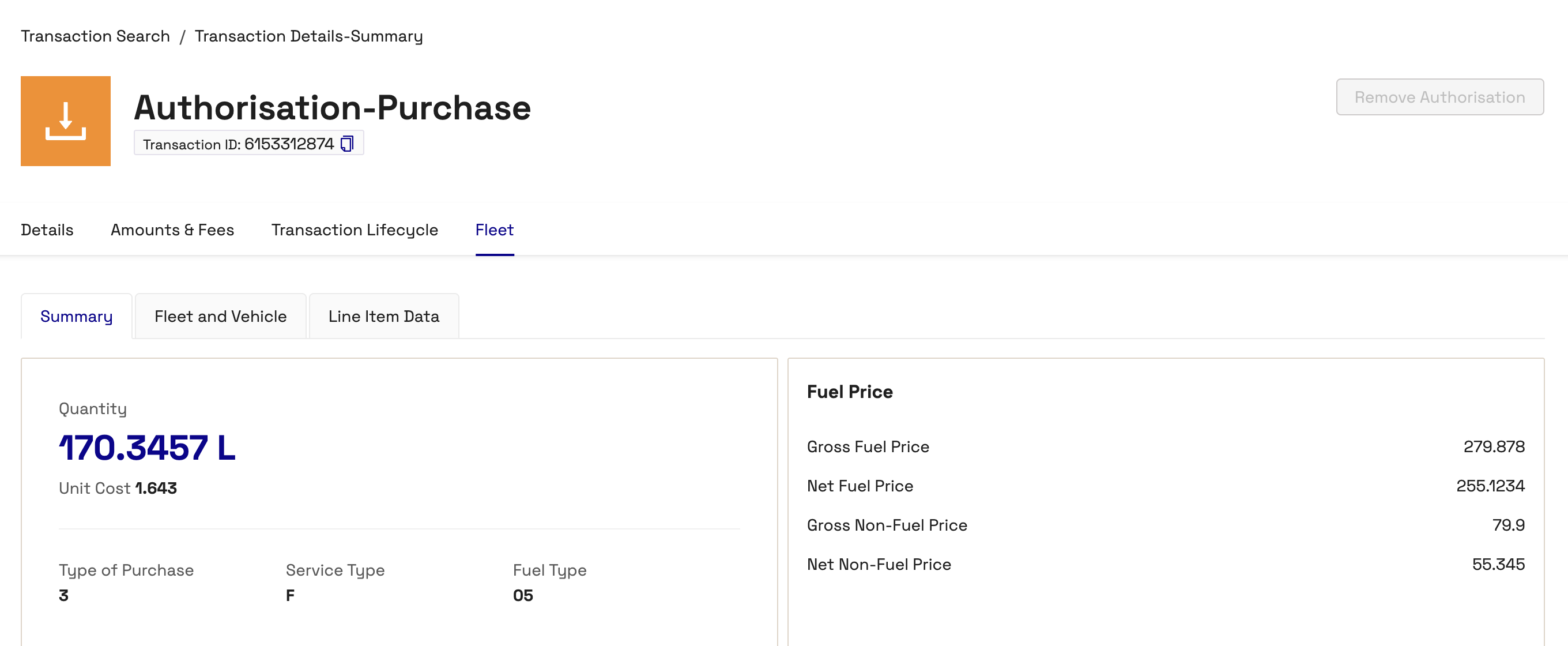
The Fleet tab consists of three tabs:
-
Summary
-
Fleet and Vehicle
-
Line Item Data
Summary Tab
The Summary tab contains high level information on the fleet transaction.
The following table describes the fields in the Summary tab.
|
Field |
Description |
|---|---|
|
Quantity |
Quantity of the fuel. |
|
Unit Cost |
Unit cost in the transaction currency. |
|
Type of Purchase |
The type of purchase as single fuel code, non-fuel purchase, fuel and non-fuel purchase, fuel purchase with multiple fuel codes. |
|
Service Type |
Defines the category of the service. Includes Full Service, Self Service, and High-Speed Dispense. |
|
Fuel Type |
The type of fuel. Refer to Appendix H of the VISA Fleet 2.0 Implementation Guide for Merchants, Acquirers, and Issuers guide for the list of types. |
|
Gross Fuel Price |
Gross fuel price in the transaction currency before any deductions. |
|
Net Fuel Price |
Net fuel price in the transaction currency after any deductions. |
|
Gross Non-Fuel Price |
Gross non-fuel price in the transaction currency before any deductions. |
|
Net Non-Fuel Price |
Price of item that is not fuel in the transaction currency, for example parking after any deductions. |
|
Non Fuel Product Code |
Contains a category code related to a purchased non-fuel item. For a full list of available category codes, see Appendix I of the VISA Fleet 2.0 Implementation Guide. Up to eight non-fuel items can be included in a single transaction. |
Fleet and Vehicle Tab
The Fleet and Vehicle tab contains information on the vehicle associated with the transaction. It is split into four sections:
-
Fleet Prompt and Restrictions
-
Charging Session
-
Power & Energy
-
Environmental & Range Data
The following table describes the fields in the Fleet and Vehicle tab.
|
Field |
Description |
|---|---|
|
Odometer Reading |
Odometer reading at the time of the transaction. |
|
Fleet Work Order Number |
Number used to identify the fleet order/purchase. |
|
Fleet Trailer Number |
Number assigned to the Fleet trailer. |
|
Fleet Service ID |
Identifies the Fleet unit taking part in the fleet transaction.This can be the driver's ID, a vehicle ID or a generic ID to define the fleet unit. |
|
Fleet Employee Number |
Displays the identifier assigned to the employee who is using the fleet card. |
|
Start Time Of Charge |
The start time of EV charge. |
|
Finish Time Of Charge |
The finish time of EV charge. |
|
Total Time Plugged In |
The total time plugged in. |
|
Total Charging Time |
The actual time for EV charging. |
|
Charging Reason Code |
Reason code that states any situations or issues with the charging session. |
|
Charging Power Output Capacity |
The charging station power output capacity in kW. |
|
Maximum Power Dispensed |
Contains maximum power dispensed during the specific charge session from the charging station. This can be different from the power output capacity of the station based on power management by the site operator. |
|
Connector Type |
Contains a Visa-defined code for a specific connector type for electrical vehicle charging. Identifies the connection/electrical vehicle for the charge session. |
|
Estimated Kilometres/Miles Added |
Provides the estimated kilometres or miles added as the result of fuel purchase. The Kilometre or mile unit depends on the country of implementation. |
|
Estimated Kilometres/Miles Available |
Provides the estimated range the vehicle will have when it leaves the fuel/service station. |
|
Carbon Footprint |
Provides the carbon footprint avoidance (how much you saved from this charge) measurement for the purchase on the transaction. Measured in grams of carbon dioxide equivalent (CO2e). |
Line Item Data Tab
The Line Item Data tab enables you to view presentment information on the transaction (including VAT details).
The following table describes the fields in the Line Item Data tab.
|
Field |
Description |
|---|---|
|
Description |
The description of the item being invoiced. |
|
Product Code |
The product code of the Visa Fleet Card product that is being invoiced. |
|
Commodity Code |
Displays extra categorisation of the product that is being purchased. This can be the same as the fuel/non-fuel product code, though VISA does not have restrictions for using different codes. |
|
Quantity |
The quantity of the item being invoiced. |
|
Unit of Measure |
The unit of measure for the type of purchase, such as petrol or EV charging. For example, for petrol purchases in the USA, it is US Gallon. |
|
Unit Cost |
The unit cost of the item being invoiced in the transaction currency. |
|
Discount Per Item |
The discount of the line item as a percentage. |
|
Line Item Total |
The total amount of the line item in the transaction currency. |
|
VAT Tax Amount |
Value-added tax amount for the fuel purchased in the transaction currency. |
|
VAT Rate |
Value-added tax rate for the fuel purchased in the transaction currency. |