Appendix L: Fees Configuration
This page details each of the fields that display when viewing fees configuration details.
-
Auth Fee Group Configuration
-
Recurring Fee Group Configuration
-
Group Web (Web service fee group) Configuration
Auth Fee Group Configuration
The following table details each of the fields in the Auth Fee Group Configuration section of the page. The Authorisation Fee group enables you to define unique fees for each type of card authorisation transaction, such as Debit POS payments and ATM Payments. What authorisation types display depend on what has been set up in your Product Setup Form. For more information, see the Fees Guide: Completing your PSF.
The name of the Auth Fee Group displays above the details.
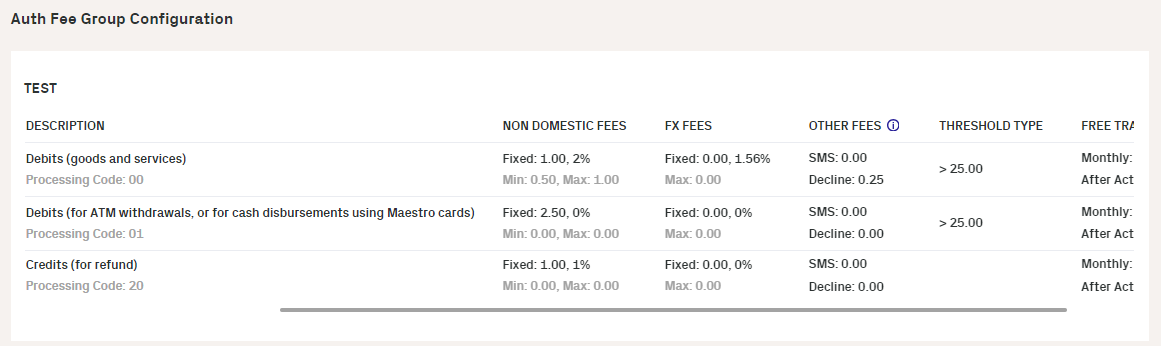
Figure 57: Auth Fee Group Configuration for a card
The following table describes each of the fields for the Auth Fee Configuration.
|
Field |
Description |
|---|---|
|
Description |
The name of the authorisation type and the corresponding processing code. |
|
Allow Partial Payments |
If set, indicates that if a balance doesn't have enough funds to cover the entire fee for the authorisation type, the remainder of the balance is taken instead. |
|
Domestic Fees |
Details on the domestic fees for the authorisation type. This includes a fixed amount to charge as a fee, a percentage of the billing amount to charge as a fee, and the minimum and maximum values for the fee. |
|
Non Domestic Fees |
Details on the non domestic fees for the authorisation type. This includes a fixed amount to charge as a fee, a percentage of the billing amount to charge as a fee, and the minimum and maximum values for the fee. |
|
FX Fees |
Details on the FX transaction fees for the authorisation type. This includes a fixed amount to charge as a fee, a percentage of the billing amount to charge as a fee, and the minimum and maximum values for the fee. |
|
Other Fees |
Other fees that are applied on a transaction, such as on a specific response code for transaction declines, or SMS notifications. For example with transaction declines, you can apply a fee on a card where a transaction exceeds a limit. |
|
Threshold Type |
Indicate the threshold in which the fee will be charged for the billing amount. For example, if the value is set to > 25.00, then the fee will only be applied when the billing amount is over 25 in the currency of the card. |
|
Free Transactions |
The number of free transactions in a month before the fee is applied. |
Recurring Fee Group Configuration
The following table details each of the fields in the Recurring Fee Group Configuration section of the page. Recurring fees are applied on a recurring basis, based on the frequency you specify (For example, monthly or annually). What recurring fee types display depend on what has been set up in your Product Setup Form. For more information, see the Fees Guide: Completing your PSF.
The name of the Recurring Fee Group displays above the details.
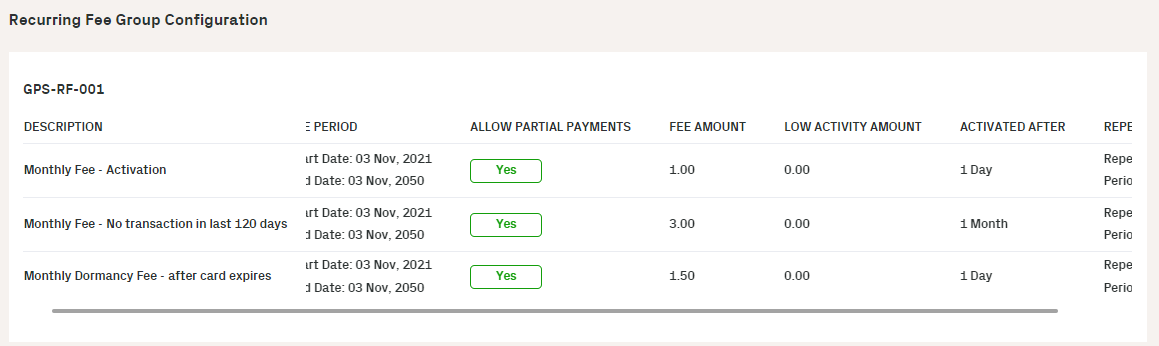
Figure 58: Recurring Fee Group Configuration for a card
The following table describes each of the fields for the Recurring Fee Configuration.
|
Field |
Description |
|---|---|
|
Description |
The description of the recurring fee type. |
|
Fee Period |
The period in which the fee is valid. |
|
Allow Partial Payments |
If set, indicates that if a balance doesn't have enough funds to cover the entire fee for the recurring fee type, the remainder of the balance is taken instead. |
|
Fee Amount |
The fee amount for the recurring fee type. |
|
Low Activity Amount |
The amount that is considered low activity for the recurring fee. |
|
Activated After |
The period of time that is considered for the Low Activity Amount value. For example, activate after a 3-month period if the low activity amount is set to £10. |
|
Repeat Every |
The period after the recurring fee on the card (after the first recurring fee charge) will be applied again. |
Group Web (Web Service Fee Group) Configuration
The following table details each of the fields in the Group Web (Web Service Fee) Group Configuration section of the page. Web Service fees can be applied to a card when specific Thredd API are used (Thredd REST-based Cards API or SOAP Web Services). Examples of use of Thredd API include card balance enquires, card replacement, card load and bank transfer fees. For more information, see the Fees Guide: Completing your PSF.
The name of the Group Web (Web Service Fee) displays above the details. In the following example, the group is called Web Fee Test.
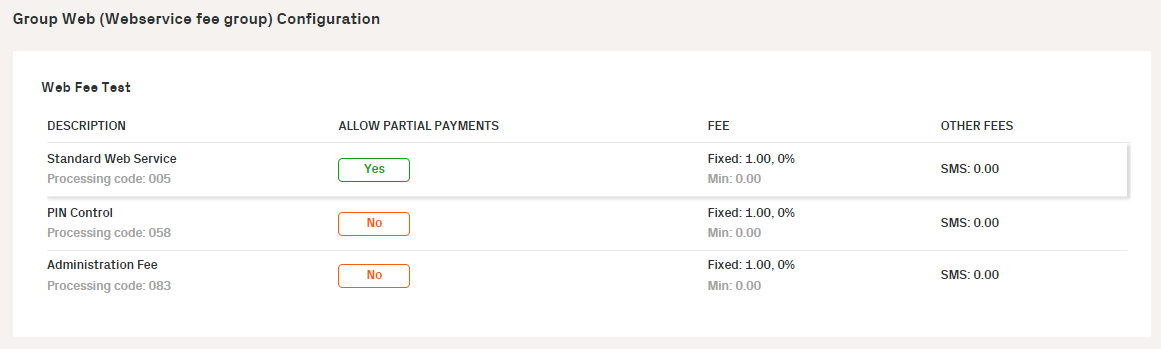
Figure 59: Group Web (Web Service Fee Group) Configuration for a card
The following table describes each of the fields for the Group Web (Web Service Fee Group) Configuration.
|
Field |
Description |
|---|---|
|
Description |
The description of the API and the processing code assigned to the API. |
|
Allow Partial Payments |
If set, then it will take a fee amount less than the full amount configured or calculated. |
|
Fee |
Details on the fee when the web service is used. This includes the fixed fee in the cardholder's currency, the percentage of the billing amount to charge, and the minimum fee for using the API . |
|
Other Fees |
Other fees associated with using the API. For example, the fee to be charged if an SMS is sent for the event. |