2 Parties Involved in 3D Secure
During the 3D secure authentication session, several parties are involved in exchanging data. See the example below:
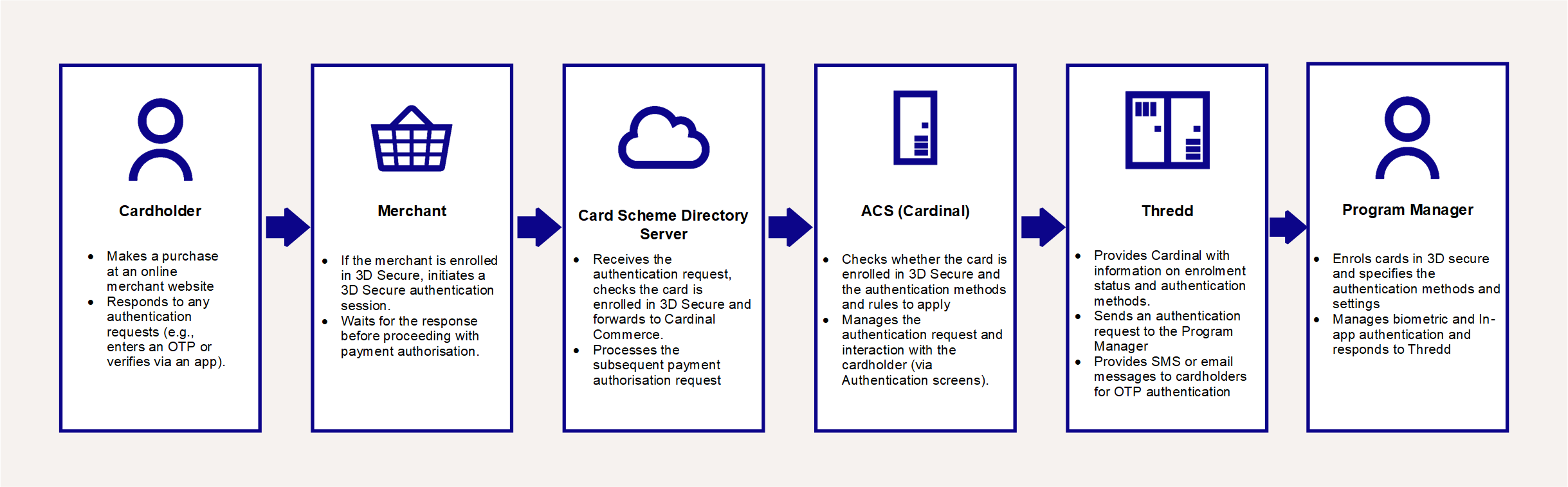
Figure 1: Flowchart of Parties involved 3D Secure
Cardholder
The cardholder’s card must be enrolled in the 3D Secure RDX service and enabled for authentication types such as Biometric authentication and OTP SMS. Thredd provides an option to auto-enrol the cards in your program, see Card Auto Enrolment. Alternatively, you can do this using either our SOAP-based Thredd API The Thredd API consists of web services that use SOAP and the Cards API based on REST. or our REST-based Cards API The Thredd Cards API are REST-based API that enable you to create and manage the cards in your card programme using JSON messages.. See Using the Card Enrolment API.
During the online checkout process, if the transaction does not meet the rules you have configured for frictionless authentication When a transaction is approved without requiring any manual input from the cardholder., the cardholder is presented with 3D Secure authentication screens1. They authenticate based on one of the selected options set up for their card, for example, by entering a one-time password (OTP) or via Biometric verification (e.g., fingerprint or face recognition).
Merchant
The merchant must support 3D Secure for an authentication session to occur. The cardholder visits the merchant’s website, and at the checkout stage, when payment is requested, in the background the merchant’s systems initiate a 3D Secure session.
Most merchants use a Payment Gateway, provided by an online payment service provider, to support their payment process. The Payment Gateway handles the connection to the Card Scheme (payment networks) and the 3D Secure authentication request.
Card Scheme (Network)
The Card Schemes (Networks such as Visa, Mastercard or Discover) receive all payment authorisation requests from merchants. The Schemes maintain Directory Servers, with details of card BIN ranges. They check the BIN range to determine whether the card is enrolled in the 3D Secure service and who the 3D Secure service provider for that card is, and then route the request to the service provider.
Cardinal Commerce
Cardinal is the provider of the Thredd 3D Secure service. They receive 3D Secure authentication requests from the Card Schemes (payment networks) and check their database for the 3D Secure rules you have configured in the Cardinal Portal for cards in this BIN range2.
If 3D Secure authentication is required, they send a request to Thredd for the types of authentication supported by the card. They provide 3D Secure Authentication screens to the cardholder. See Cardinal Configuration of RDX Biometric and Screens.
-
If OTP SMS is selected, then Cardinal generates the OTP and sends it to Thredd. They provide the cardholder with relevant screens and messages.
-
If Biometric In-App or Out of Band In-App is selected, then Cardinal provides the cardholder with relevant screens and messages and sends Thredd a message to initiate an authentication session with the Program Manager.
-
If KBA is being used, this typically follows OTP SMS authentication. Cardinal presents a security question to the cardholder and returns the answer to Thredd for verification.
Thredd
Thredd manages the communication with Cardinal and the Program Manager. During an authentication session, Thredd sends Cardinal a list of the authentication types for which the card is registered3. Cardinal can use these details to present the available authentication methods to the cardholder.
Depending on the option selected, Thredd support the authentication process as follows:
-
For OTP SMS, Thredd receives the OTP from Cardinal and sends the OTP to the cardholder’s mobile phone. See Appendix 2: OTP Message Templates.
-
For KBA, Cardinal sends the cardholder’s security question answer to Thredd. Thredd compares the answer to the details held in the Thredd database and returns a response to Cardinal.
-
For Biometric In-App, Thredd notifies your systems of a request to start an authentication session. Your systems manage the cardholder authentication via your smart phone application and return a response to Thredd. Thredd notify Cardinal of the result.
Program Manager
As a Thredd Program Manager, you must sign up for the 3D Secure RDX service with Thredd and set up your 3D Secure rules on the Cardinal Portal. See Steps in a 3D Secure Biometric/In-app Project.
During the implementation phase, you can ask Cardinal to configure the logo and text that appears on the 3D Secure Authentication screens that they display to the cardholder during the authentication process.
You can use either the Thredd Thredd API The Thredd API consists of web services that use SOAP and the Cards API based on REST. or Cards API The Thredd Cards API are REST-based API that enable you to create and manage the cards in your card programme using JSON messages. to enrol your cards in the 3D Secure service and request to register in Thredd the authentication types supported by the card. See Using the Card Enrolment API. An option is also available for auto-enrolment. See Card Auto Enrolment.
For KBA authentication, you can use either our Thredd API or our or Cards API to send Thredd details of the question and answer to use during KBA.
For Biometric and In-App authentication, you will need to implement additional API to receive verification requests from Thredd and send verification results to Thredd. See Using the Thredd oAuth Server and Using the Biometric/In-App Authentication API.
Your customer application must be able to manage the authentication on the cardholder’s smart device: when you receive a Biometric/In-App authentication request from Thredd, your systems will need to load your customer application in the user’s smart device and authenticate via an appropriate Biometric method (e.g., fingerprint or facial recognition) or In-App method (e.g., username and password or using a Token device). You then need to return a response to Thredd.